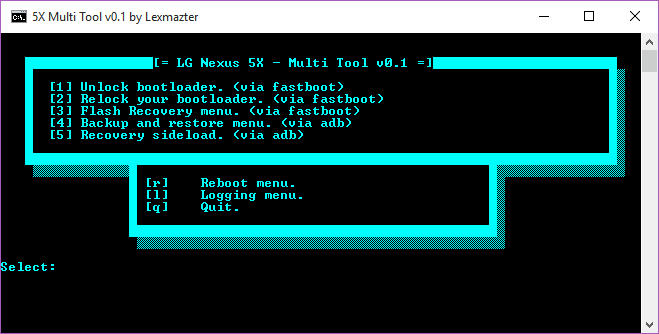

Also, to avoid useless threads on general, Q&A or useless posts, please read the FAQ below, it's like a Mini-Guide!Disclaimer:I will not be responsible for smashed screens, bricked phones or any other things that you can accuse me of, i've done this tool to help people, use it at your own risk and hit THANKS if you use it and like it.
It has LINUX/UNIX and MAC support!
In order to use the linux version, read the readme-linux file, do what says there.
After that run 5XMultiToolvX.X-L.sh in terminal.
MAC users should run 5XMultiToolvX.X-M.sh


Features:- Unlock bootloader.
- Relock your bootloader.
- Flash custom recovery - As soon as they are available
- Make logfiles - logcat/dmesg.
- Backup and Restore.
- Sideload zip files.
- Fancy reboot your device :).
- More features will come as they are needed.
Download link:5X Multi Tool v0.1 - 830 KB
Tutorials/FAQ:Q: What do i need to do in order to install a custom ROM?
1. Unlock Bootloader.
2. Flash a custom recovery of your choice.
3. Flash custom ROM with no problems via recovery.
All those things are found and can be done via this tool.
Q: Hi, i just downloaded this tool, how do i use it?
First, extract the folder somewhere.
After that, run 5XMultiTool vX.X.bat on windows by double clicking it, open terminal and put sh 5XMultiToolvX.X-L.sh on linux and sh 5XMultiToolvX.X-M.sh on mac.
Q: I see you talk about some 5XMultiTool vX.X, is that an eXtreme edition or something?
No, vX.X will be replaced with the version from the title of the thread, this is made like this to keep things clean over future updates, so there will be no need to change things all around the thread after each update.
Q: Hi, i just bought a phone what should i do now?
Well, you firstly need to unlock your bootloader...
Q: What is logcat?
Well, you can pretty much use google for that answer, but to put it short, is that thingy that tells you what is happening behind the scenes of your phone.
It is usually used for debugging and entertaiment(?).
When you report an error/bug to somebody, it will be a blessing to provide a logcat (logfile)!
Q: What is a Custom Recovery and why do i need one?
A custom recovery is that thingy that let's you flash .zip files, use your logic and you wil get it why you need one.
Q:There are others guides/tutorials out there, should i check them instead of this?
If you manage to get things done using this one, no, otherwise yes, note that some could be outdated...
Q:What is sideload and how do I use it?
Sideload is a function from adb that let's you flash a zip file while in recovery directly from your PC.
Changelog:v0.1 - 29 Sep 2015 - First public release providing bootloader unlock, relock, logging (logcat and dmesg), backup and restore, rebooting, adb sideload.
Coming soon:- Recovery flashing (CWM, TWRP, stock) - when available.
Aucun commentaire:
Enregistrer un commentaire